
Enterprise workflow automation rarely lives in isolation. Every business process needs to talk to external systems. With Imixs-Connect we provide a new workflow integration layer to define stable contracts between different IT systems.
The Problem with Traditional Integration Approaches
The classic answer is to build a dedicated client inside the workflow engine. You write the code, you manage the API keys, you handle the error cases — and suddenly you own the integration. When the ERP changes its API, when the CRM goes down, when the data doesn’t synchronize correctly — the workflow team gets the call. But this is not a technical problem. It is an architectural one.
Building system-specific clients inside a workflow engine moves responsibility in the wrong direction. The team that knows the external system best — the ERP developer, the CRM administrator, the integration specialist — is not involved. The workflow team, which knows the process best, ends up owning business logic that belongs elsewhere.
A Better Approach: Invert the Responsibility
With Imixs-Connect you have now a new open source solution that solves this problem with a simple but powerful idea: instead of implementing a client for each external system, Imixs-Connect calls a generic HTTP endpoint that the external system provides.
The contract is minimal and fully standardized. Imixs-Connect sends a filtered snapshot of the workflow data as an Imixs XMLDocument — the same format already used by the Imixs REST API. The external system processes the data and responds with an XMLDocument containing the result items to be written back into the workitem.
Imixs-Workflow                     External System
──────────────                     ───────────────
WorkItem
  → filter request-params
  → XMLDocument          ──POST──►  /your-endpoint
                         ◄─200 ───  XMLDocument
  ← merge result-params
WorkItem enriched ✅
The external team holds full control over their endpoint. Imixs-Connect is responsible for the call — nothing more.
How It Works in Practice
Integration is configured directly in the BPMN model. The process modeller defines which data items are sent to the external system and which items are written back — without ever seeing a URL or an API key. Credentials are managed by the administrator in a separate configuration file.
<imixs-connect>
    <endpoint-id>SAP</endpoint-id>
    <on-error>continue</on-error>
    <request-params>offer.company, offer.amount</request-params>
    <result-params>customer.id, customer.name, customer.status</result-params>
</imixs-connect>
Error handling follows the same pattern as the rest of the Imixs Adapter API: a communication failure sets adapter.error_code on the workitem, and the BPMN modeller can define conditional sequence flows to handle it — retry, escalate, or continue gracefully.
A Connector Library, Not Just an Adapter
What makes Imixs-Connect more than a single adapter is its connector library concept. Because the protocol is always the same — a standard XMLDocument POST — adding support for a new integration target requires no Java code at all.
Each connector module contains ready-to-use documentation, Docker Compose setups, and importable workflow templates for its target platform. The first connector available is imixs-connect-n8n, with a complete step-by-step tutorial showing how to configure an N8N Webhook as an Imixs-Connect endpoint and build a working customer validation workflow in under 30 minutes.
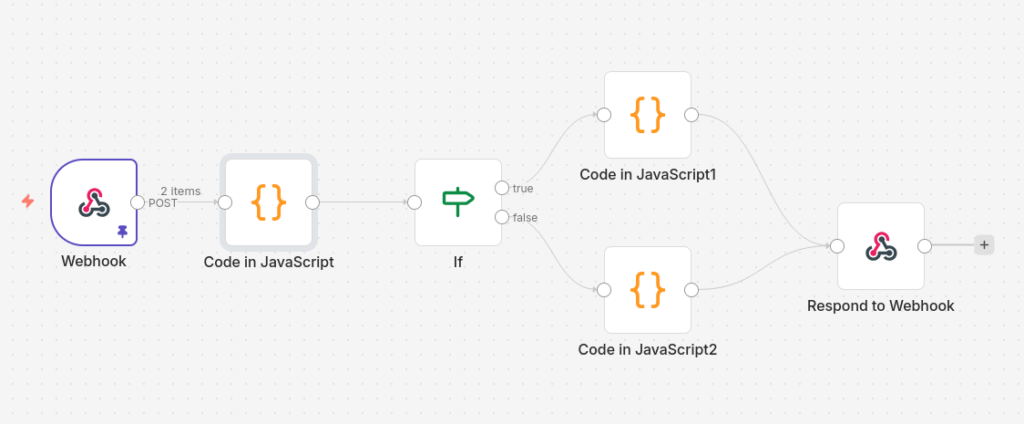
More connectors — for Make, Zapier, Microsoft Power Automate and others — can be added by the community without touching the core.
Built on Proven Imixs Architecture
Imixs-Connect follows the same architectural principles as Imixs-AI: a clean three-layer design with a configuration service, a connection factory, and a business logic service — all wired together by a Signal Adapter that integrates seamlessly into the BPMN processing lifecycle.
The payload format is not proprietary. It is the standard Imixs XMLDocument schema, already documented and already used by the Imixs REST API. Any developer on any platform can implement a compatible endpoint by reading a single documentation page.
Get Started
Imixs-Connect is open source and available now on GitHub:
github.com/imixs/imixs-connect
The repository includes:
- The core adapter library (
imixs-connect-core) published to Maven Central - A complete N8N integration tutorial with step-by-step instructions
- An endpoint implementation guide for Java developers
Join the Community
The best way to grow Imixs-Connect is through new connector modules. If you have integrated Imixs-Workflow with an external platform — whether it is a cloud automation tool, an ERP system, or a custom service — consider contributing your configuration as a connector module. No Java required.
Open an issue, start a discussion, or submit a pull request at github.com/imixs/imixs-connect. Every connector added makes the platform more valuable for the entire Imixs community.
Imixs-Connect is licensed under the Eclipse Public License 2.0 and is part of the Imixs-Workflow open source ecosystem.