Security warnings have always been part of the software landscape. But something has shifted recently. The latest wave of reports is different – and it is not just the usual noise. The Threat is Real – “The question is no longer whether your application will be attacked. The question is whether your data is still safe after the attack succeeds.”
AI-assisted attacks are changing the rules of the game. Where a human attacker once needed hours or days to analyze application code, identify vulnerabilities, and craft an exploit, an AI-powered tool can do the same in minutes. Automated reconnaissance, pattern-based vulnerability detection, intelligent fuzzing – what used to require deep expertise is becoming increasingly accessible.
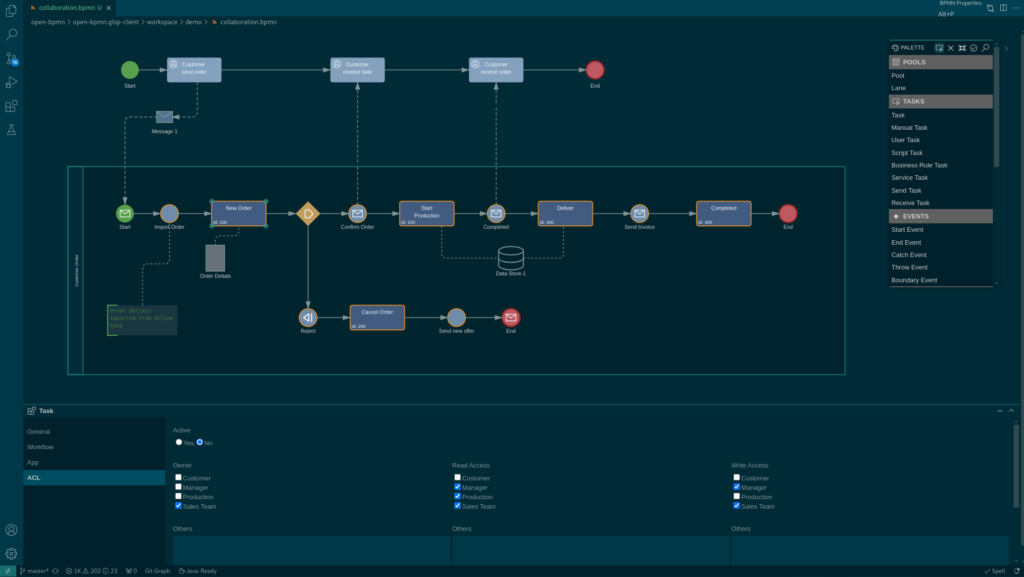
These days we have released the latest version of Open BPMN, a free and open modeling platform to view, create and maintain BPMN 2.0 models. Open BPMN can be used by business analysts to design a top level business process, as also by architects and developers to model the technical details of complex processing logic.
The new version includes a new routing algorithms that makes modelling more easy even in complex BPMN Models with custom routing.
In addition the new version includes an additional validation mode to validate BPMN models against the Imixs-Workflow Engine. This allows you to test your model befor uploding into your business application.
Modelling AI
With the project Imixs-AI the Imixs BPMN Engine supports a powerfull AI-Extension to model AI Assistants directly in your BPMN model. The Imixs-AI module enables you to design more complex business processes with AI integration in an easy and model based way. You can connect any AI-Model (LLM) with your business application and you are not bound to one specific model. Choose the model that fits you needs!
When we first built our Imixs SEPA Adapter Project , we relied on iban4j for IBAN and BIC validation — a solid and well-known library in the Java ecosystem. But now we decided to switch to the new open source library iban-commons.
Why We Switched to IBAN Commons
iban4j’s API is notably more complex than iban-commons — it relies on a builder pattern for constructing IBAN objects and, as the benchmarks reveal, is not particularly memory-efficient. For the Imixs-SEPA workflow adapter project that may process hundreds of payment records, that matters.
With the latest version of Imixs-AI we just shipped a new feature extending BPMN with AI: Tool Calling support for the OpenAI API. This is a powerfull new feature introducing a fundamental shift in what an LLM can do inside a workflow application.
From answering questions to starting business processes
Until now, an LLM integrated into Imixs could analyze data, generate text, evaluate conditions, and assist users with information. All of that is great. But the LLM was always just talking. It could tell you “you should start a vacation request” — but it couldn’t actually do it. Tool Calling changes this completely.
With Tool Calling, the LLM no longer just responds with text. It can respond with a structured request to execute a function in your application. Consider this scenario:
A user types into the workflow application:
"I need next week off."
Imixs-AI now doesn’t explain how to submit a vacation request. It doesn’t ask for clarification. It fires a tool call:
Now a business application based on Imixs-AI is able to handle this respons and start the correct BPMN process — all from a single natural language sentence. No menus, no navigation, no searching. Just say what you want and it happens.
Imixs Data Groups are a new concept to model bidirektional relationships between process instances within a BPMN 2.0 Model. The open source project Imixs-Data provides an easy and flexible way to use the Imixs-Data-Groups as an extension for the Imixs Workflow engine. In this blog post I will demonstrate how you can use Data Groups in your process model.
Bidirectional Relationships
Data groups allow you to organize and group related workflows under a master process. For example, you want to summarize all payment transactions of a customer in a consolidated ‘Statement of Account’. Or you may want to group invoices that need to be exported into another IT system in an ‘Export process’. A data group defines a bidirectional relationship between a set of process instances and a so called data group – also called master process.
Theia IDE is a modern, AI-native IDE which can be run on Desktop as also in a Docker container as a Web app. With the Docker image you can deploy Theia IDE in a Kubernetes cluster. The deployment is straightforward — until you try to use extensions that open embedded browser windows. This post explains the problem and how to solve it using wildcard certificates with DNS-01 challenges.
If you work on modern enterprise IT systems, “AI Agents” are the new elephant in the room. Every day, new YouTube videos appear where someone talks enthusiastically about AI Agents and Agentic AI. The base line – software systems not using AI Agents are outdated and behind the times. But what does it really mean to integrate an AI agent into critical business applications?
Imixs-Workflow is an open-source project for building transactional, secure, and transparent business applications based on the BPMN 2.0 modeling standard. The idea is simple: you describe a business process in a model, then use a workflow engine to execute that model. The concept of a workflow engine is not new, but it remains a well-grounded approach to executing predefined business processes in a transparent, comprehensible, and transactional context. This simply means that the workflow engine guarantees a task is carried out exactly as previously defined. Execution can be performed by both IT systems and humans.
Let’s have a look how this concept is related to AI Agents.
With the latest version of the Imixs-Adapters Project 3.2.2, Imixs now offers a MyFactory Adapter that allows seamless integration between MyFactory ERP and the Imixs-Workflow engine. This adapter enables you to search customers, retrieve contact persons, or update sales orders directly from your workflow applications.
But this blog post is not just about a new adapter. It’s about why we built it and what it tells us about the state of enterprise software integration in 2025.
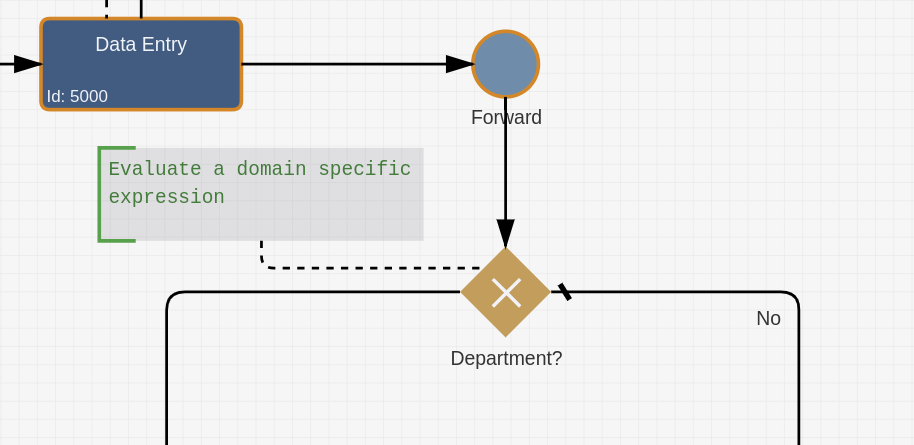
With our latest version of Imixs Workflow, we introduce a game-changing approach to business process automation, enabling domain-specific handling of BPMN 2.0 conditions.
The Challenge
In previous versions, conditional sequence flows in the Imixs Workflow engine —as in most traditional BPMN engines — could only be defined using script functions. While this scripting-based approach offered flexibility, it also introduced several limitations:
Domain-specific languages could not be supported
Conditions were tightly coupled to technical implementation
Adding new evaluation logic required modifying or extending engine code
Complex business rules were difficult to express and maintain
These constraints made it challenging to adapt and extend business logic across different domains.
The Solution: CDI Event-Driven Condition Evaluation
Imixs Workflow now introduces a revolutionary and extensible architecture for condition evaluation. Leveraging Jakarta EE’s CDI (Contexts and Dependency Injection) events, conditions can be transformed and interpreted by specialized observers before evaluation — all without modifying the core engine.
This new approach not only supports functional scripting, but also enables fully domain-specific evaluation of BPMN 2.0 conditions, such as SQL-based queries, external API calls, or even AI-driven logic.
How It Works
When a sequence flow condition is encountered, the system fires a CDI event that any registered observer can intercept and handle. Observers can:
Translate domain-specific languages into executable code
Implement business rule languages tailored to specific domains
Add validation, monitoring, and auditing layers
Integrate external services and rule engines
Real-World Example: Domain-Specific Conditions
Instead of writing complex JavaScript like this :
// Before: Hard-coded and difficult to maintain
!['AT', 'BE', 'BG', 'HR', ...].includes(workitem.getItemValueString('country'))
You can now define business rules in a domain-specific language:
SQL: SELECT COUNT(*) FROM eu_countries WHERE country_code = ? > 0
A specialized domain observer intercepts this rule and translates it into the appropriate JavaScript. The beauty? The RuleEngine doesn’t need to know anything about domain-specific languages — it simply evaluates the resulting JavaScript as it always has.
Implementation Example
The new event-driven design of Imixs Workflow is built on Jakarta EE’s CDI (Contexts and Dependency Injection) event mechanism — a core implementation of the Observer Pattern. This means that custom components can observe and react to condition evaluation events without depending on the workflow engine itself.
Creating your own domain-specific observer is straightforward. Simply extend the new ConditionalExpressionEvent class and implement your logic as a CDI observer method:
@ApplicationScoped
public class DepartmentSQLRule {

    public void onConditionEvaluation(@Observes ConditionalExpressionEvent event) {
        String condition = event.getCondition();

        if (condition.startsWith("SELECT ")) {
            // Transform domain-specific rule into JavaScript
            String javascript = translateSQLRule(condition, event.getWorkitem());
            event.setCondition(javascript);
        }
    }
}
In this example, the observer listens for every ConditionalExpressionEvent. If the condition starts with an SQL statement, it automatically transforms the domain-specific rule into executable JavaScript. Because this is handled entirely via CDI events, the core RuleEngine remains untouched — ensuring maximum flexibility and extensibility.
Opening Doors for Enterprise Development
This new observer-based architecture fundamentally changes how enterprise workflow systems are developed and evolved. By decoupling condition evaluation from the core engine, organizations gain unprecedented flexibility in how business rules are expressed, validated, and executed. Teams can now create tailored domain-specific languages that speak the language of their business domain—whether that’s banking regulations, insurance underwriting, supply chain logistics, or healthcare compliance.
The plugin-based approach means that new capabilities can be added without touching the workflow engine itself. Observers can be developed independently, tested in isolation, and deployed without impacting existing systems. This enables enterprises to build sophisticated, multi-layered workflow systems where each layer serves a specific purpose: one observer might handle compliance validation, another translates business rules into executable code, a third provides audit logging—all working seamlessly together.
The possibilities are as diverse as the challenges enterprises face. Complex routing logic that once required extensive JavaScript development can now be expressed declaratively. Integration with external rule engines and services becomes straightforward. Most importantly, subject matter experts and business analysts can participate directly in defining and maintaining business rules, reducing the gap between business requirements and technical implementation.
We’re excited to see OW2 recognizing Imixs Workflow as Project of the Month – November. OW2 stands for open, collaboratively developed enterprise software – a mission that perfectly matches our own: building sustainable, transparent BPM solutions for everyone. A big thank you to our community and all contributors who keep improving Imixs Workflow. Open source makes a difference – together we’re shaping the future of Business Process Management.