
Imixs Data Groups are a new concept to model bidirektional relationships between process instances within a BPMN 2.0 Model. The open source project Imixs-Data provides an easy and flexible way to use the Imixs-Data-Groups as an extension for the Imixs Workflow engine. In this blog post I will demonstrate how you can use Data Groups in your process model.
Bidirectional Relationships
Data groups allow you to organize and group related workflows under a master process. For example, you want to summarize all payment transactions of a customer in a consolidated ‘Statement of Account’. Or you may want to group invoices that need to be exported into another IT system in an ‘Export process’. A data group defines a bidirectional relationship between a set of process instances and a so called data group – also called master process.
The following diagram shows an example from an invoice workflow. After an invoice was approved and the due date is reached, the invoice is added to a data group of the workflow ‘Payment’. The invoice holds now the relationship to the payment run.
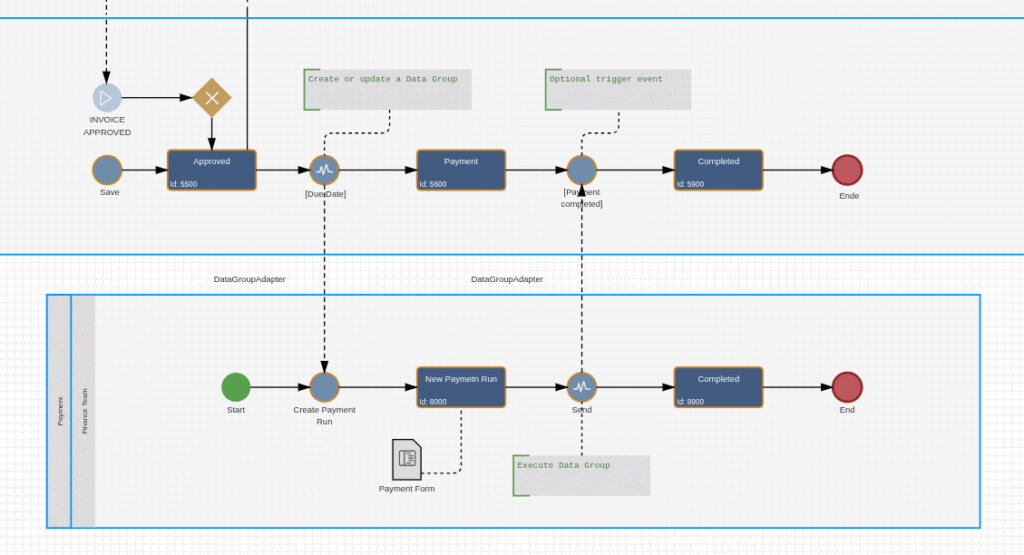
As soon as the payment workflow is completed (payment data is send to the banking system), the Adapter can optional also execute all related invoice documents by a specific workflow event in the BPMN 2.0 model. In this example the event ‘Payment completed’ to finish the invoice workflow.
How it Works Under the Hood
The elegance of Data Groups lies in their technical simplicity: When a workitem connects to a data group, the DataGroupAdapter checks if a matching master process already exists and creates one if necessary. The workitem then stores a reference to the data group. This approach is extremely efficient and scalable, allowing hundreds of thousands of workitems to reference a single data group without any performance degradation.
The bidirectional relationship emerges through the combination of stored references and dynamic queries. While each workitem holds a unidirectional reference to its data group, the master process can discover all its related workitems by simply asking: “Who is pointing to me?”. Using a query like (type:workitem OR type:workitemarchive) AND ($workitemref:<itemvalue>$uniqueid</itemvalue>), the master process instantly retrieves all connected workitems without ever having stored those references itself. This query-based reverse lookup transforms the technical unidirectional reference into a practical bidirectional relationship.
This design enables powerful grouping scenarios. Imagine organizing sales transactions by countries: You create just one data group per country, and millions of workitems can reference them. Navigation and aggregation remain lightning-fast because the Imixs Workflow engine simply asking “show me everyone pointing to Greenland” rather than maintaining complex bidirectional reference lists. The system scales horizontally with ease.
Build a Data Group
To build a data group just add the org.imixs.workflow.datagroup.DataGroupAdapter to the corresponding event and setup a configuration workflow result. See the following example:
<imixs-data-group name="ADD">
    <query>(type:workitem) AND ($modelversion:sepa-export-manual*)</query>
    <init.model>sepa-export-manual-1.0</init.model>
    <init.task>1000</init.task>
    <init.event>10</init.event>
    <!-- Optional -->
    <update.event>20</update.event>
</imixs-data-group>
This will add the current workitem to a new data group of the workflow model ‘sepa-export-manual-1.0′ with the initial task 1000 and the initial event ’10’. If a corresponding group already exists, the data group will be processed by the event 20 which is an optional functionality. The DataGroupService is using the given query to test if a corresponding data group already exists.
You can adapt the query to a more complex relationship. For example you can define payment runs separated by banking account or payment period by just adding an additional query condition.
Data Views
With this model you have now defined a relationship between invoices and a payment run. Each invoice is holding the reference to the data group by the default item $workitemref. You can easily collect all invoices belonging to a payment run with the following query:
(type:workitem OR type:workitemarchive) AND ($modelversion:invoice*)
 AND ($workitemref:<itemvalue>$uniqueid</itemvalue>)
The Imixs-Data project provides the subproject Imixs-Data-Views to display such an relationship as an embedded view. This UX control is part of Imixs-Office-Workflow.
Remove a Workitem from a Data Group
To remove a workitem from a data group you can use the following definition:
<imixs-data-group name="REMOVE">
    <query>(type:workitem) AND ($modelversion:sepa-export-manual*)</query>
    <!-- Optional -->
    <update.event>20</update.event>
</imixs-data-group>
This definition will remove the current workitem from a data group of the workflow model ‘sepa-export-manual-1.0’. If a corresponding group exists, the data group will be processed by the event 20 which is an optional functionality. The DataGroupService is using the given query to test if a corresponding data group already exists.
Execute a Data Group
You can also execute a Data Group and process all related worktiems of the master process.
<imixs-data-group name="EXECUTE">
    <query>(type:workitem) AND ($modelversion:invoice*) AND ($taskid:1000)</query>
    <event>20</event>
</imixs-data-group>
The tag event is mandatory. The adapter will process all referred workitems with this event in the same transaction. If at least one referred workitem can’t be process (e.g. for a ProcessingException) the transaction will be canceled and non of the referred worktitems will be updated.
Export a Data Group
An additional option is to export a Data Group. This can be usefull for example to send out an E-Mail with a Statement Of Account (SOA) defined by a data group before.
With the signal adapter class org.imixs.workflow.datagroup.DataGroupExportAdapter you can export the data of a data group either into a csv file or an excel file based on a dataview definition.
<imixs-data-group name="EXPORT">
    <type>CSV|POI</type>
    <dataview>invoices</dataview>
    <targetname>my-export.csv</targetname>
   <debug>true</debug>
</imixs-data-group>
The export file is stored into the current workitem. Find details about Dataviews here
Conclusion
Data Groups provide a flexible and powerful way to organize related workitems within your Imixs BPMN processes – whether you’re consolidating payment runs, grouping invoices for export, or managing statements of account. With the four core operations (ADD, REMOVE, EXECUTE, and EXPORT), you have all the tools needed to model bidirectional relationships between process instances without requiring complex custom code. The declarative configuration approach keeps your workflow models clean and maintainable while the DataGroupAdapter handles all the relationship management behind the scenes.
This concept opens up many possibilities for advanced workflow patterns. You can combine data groups with event-driven processing, build sophisticated approval chains across multiple master processes, or create dynamic aggregation workflows that adapt based on your business rules. The flexibility of the query-based approach allows you to fine-tune grouping criteria to match your specific requirements.
Want to learn more? Check out the Imixs-Workflow project for additional examples, detailed documentation, and the complete source code. The community is always happy to help with questions and share experiences.